

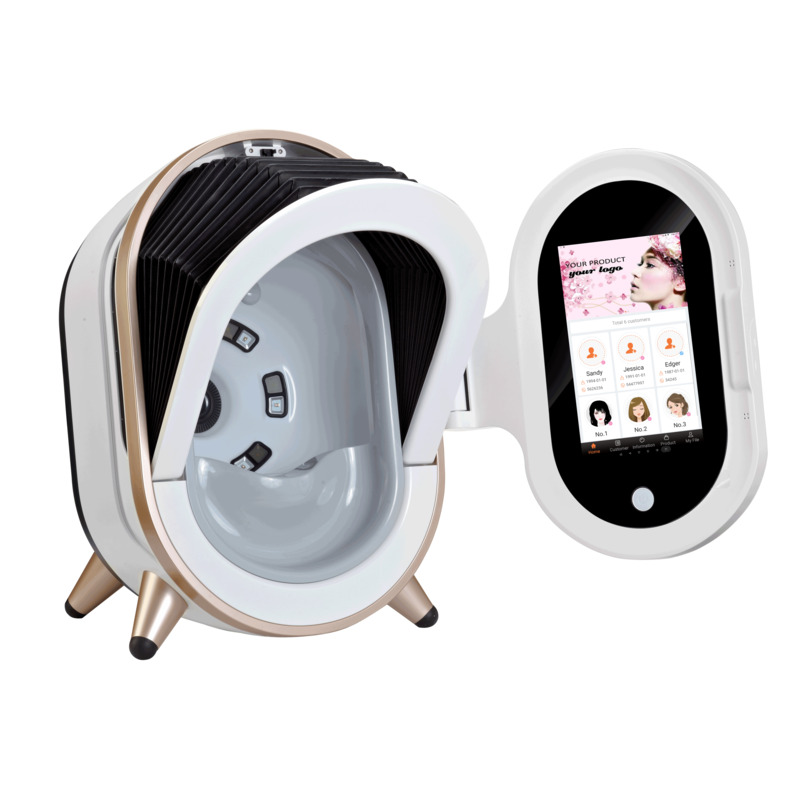
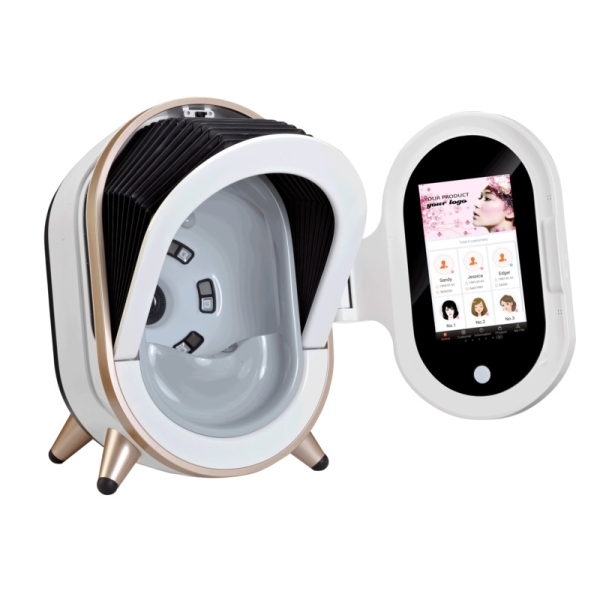



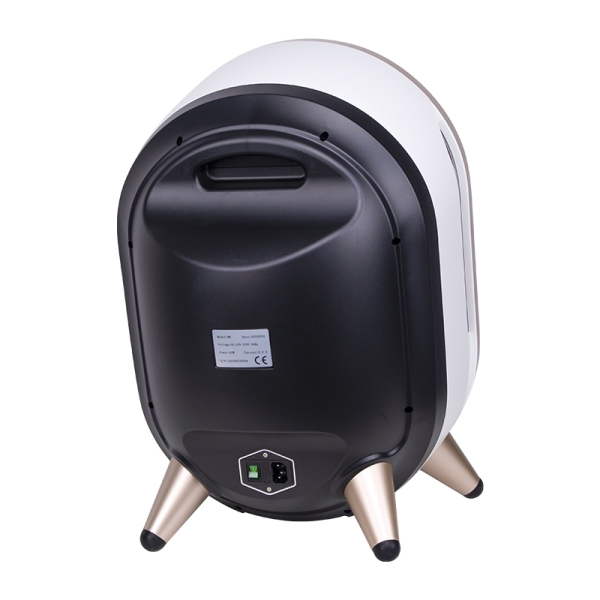




DermaScan 3D Analyzer
20MP Skin Imaging System with RGB, UV, Polarized-Light and AI-Assisted Analysis
DermaScan 3D Analyzer Specifications
| Feature | DermaScan 3D Analyzer |
| Camera | 20MP |
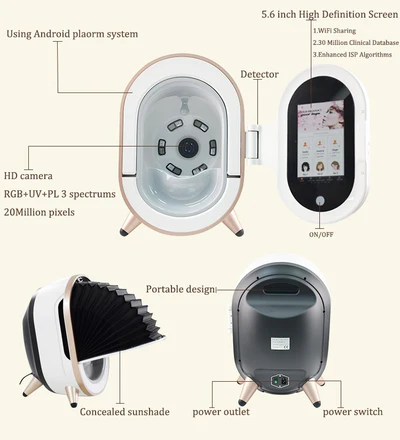
| Imaging Modes | RGB + UV + Polarized Light |
| 3D Imaging | Supported |
| AI | AI-assisted facial analysis |
| Screen | 10.1-inch touchscreen |
| Operating System | Standalone Android |
| Data Management | Cloud-based management |
| Lighting | 24 energy-saving shadowless lights |
| Connectivity | SD Card + USB |
| Power | 45W |
| Net Weight | 8kg |
Please confirm the final software configuration and included accessories with the quotation before purchase.
How DermaScan 3D Works
DermaScan 3D uses multiple imaging modes to capture facial information under controlled lighting conditions. The software then processes the captured images and organizes the results into a visual analysis report that can support professional consultation.
01 Capture The camera captures high-resolution facial images using RGB, UV and polarized-light illumination. |
02 Analyze The software processes the captured images and organizes selected facial analysis areas and visible characteristics. |
03 Review Professionals can review the different imaging results and generated reports as part of the consultation process. |
04 Explain The images provide a visual reference that can help staff explain relevant skin concerns in a more understandable way. |
05 Track Previous images and reports can be retained for future consultation and progress review. |
RGB, UV & Polarized-Light Imaging
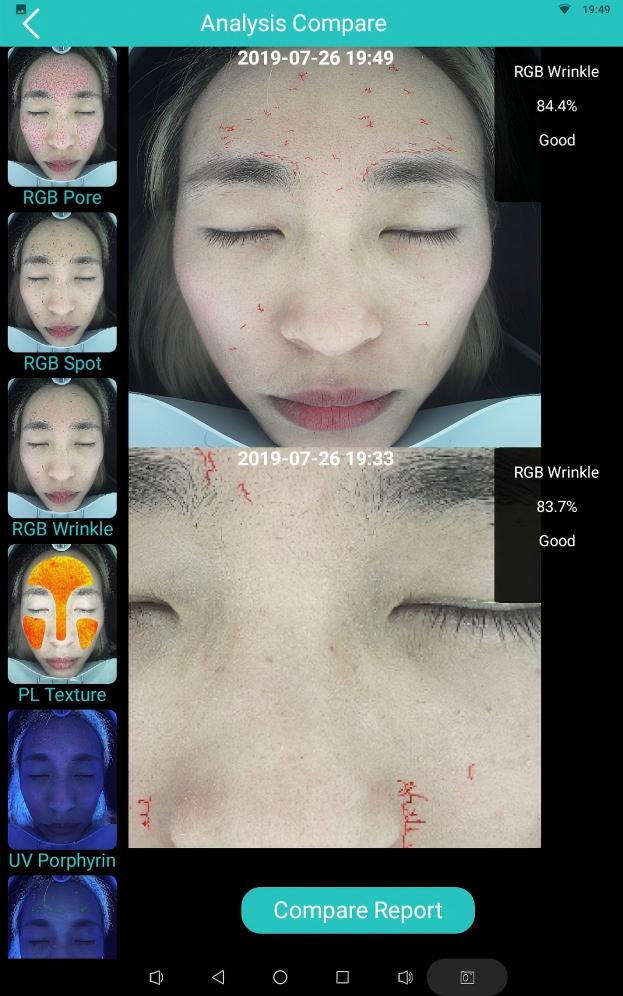
Different imaging modes provide different visual references, making multi-mode imaging more useful than relying on a single facial photograph.
RGB Imaging Provides a visible-light reference for facial appearance, texture and other visible skin characteristics. |
UV Imaging Adds another imaging mode for reviewing selected skin characteristics that may not be as apparent under standard visible light. |
Polarized-Light Imaging Helps reduce surface glare and provides a different visual reference for skin texture and other visible characteristics. |
Why Multiple Imaging Modes Matter
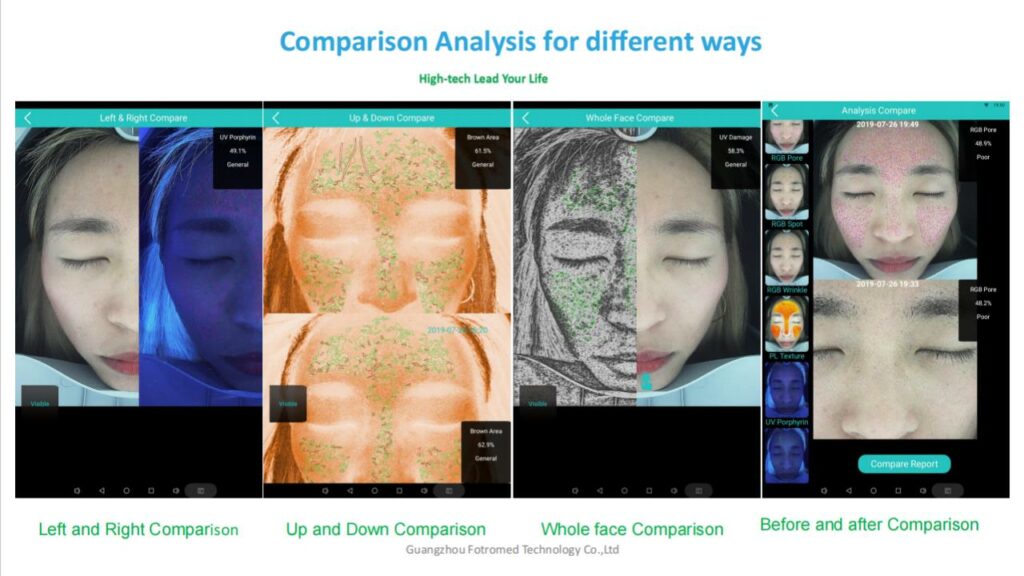
Combining RGB, UV and polarized-light images gives professionals more information to review during a consultation and creates a more structured visual record for future comparison. |
What Can DermaScan 3D Support in a Skin Consultation?
DermaScan 3D is designed to support visual skin analysis rather than act as a standalone medical diagnosis system. Depending on the software configuration, the system can help professionals review areas such as:
Pigmentation & Visible Spots Visual references for selected pigmentation-related concerns and uneven skin appearance. |
Skin Texture Images can help professionals discuss visible texture and surface characteristics during a consultation. |
Pores Visual analysis can provide a clearer way to discuss visible pore characteristics. |
Wrinkles & Fine Lines Different imaging modes provide additional visual references for discussing visible lines and texture. |
Acne-Related Skin Concerns The analysis workflow can support consultation around selected visible acne-related characteristics. |
Skin Condition Tracking Stored images and reports provide a visual reference for future consultations and progress review. |
DermaScan 3D is designed as a skin imaging and consultation support system and should not be used as a standalone medical diagnosis.
From Skin Analysis to Client Consultation
A skin analyzer becomes more valuable when it is integrated into the complete consultation workflow instead of being used only as a one-time scanning device.
01 Analyze Capture standardized facial images and review the available imaging modes. |
02 Explain Use the images and reports to show clients relevant findings in a visual and easy-to-understand format. |
03 Recommend Connect relevant analysis findings with suitable treatments, skincare products or home-care recommendations. |
04 Track Compare future scans with previous records to support follow-up conversations. |
05 Record Keep images and reports organized for future client management. |
The goal is not to discuss every indicator with every client. A better workflow is to focus on the findings that are most relevant to the client's concerns and planned services. |
Why Use DermaScan 3D in Daily Consultations?
The business value of a skin analyzer is not simply the number of indicators it can display. Its value comes from how easily the device fits into the consultation process.
Make Consultations More Visual Images and reports give staff something concrete to discuss rather than relying entirely on verbal explanations. |
Create More Structured Recommendations Analysis results can be connected to relevant treatments, skincare products and home-care recommendations. |
Support Follow-Up Previous images and reports can provide a visual reference during future consultations. |
Build Consultation Services Skin analysis can be positioned as part of an initial consultation, treatment-planning service, progress review or premium skincare consultation package. |
What Makes the DermaScan 3D Different?
The DermaScan 3D combines high-resolution imaging, multiple lighting modes, 3D visualization and AI-assisted software within a standalone system. The combination is useful for businesses that want more than a simple facial camera and need a workflow that connects:
Imaging → Analysis → Consultation → Recommendation → Follow-Up |
Rather than treating skin analysis as a separate service, clinics can integrate the system into their broader treatment and skincare workflow.
Who Is DermaScan 3D For?
The system can fit different business models depending on how skin analysis is used within the consultation process.
Beauty Salons For salons that want to add structured skin consultations to facial, skincare and home-care services. |
Aesthetic Clinics For clinics that want an imaging system to support consultation, treatment planning and follow-up. |
Skincare Businesses For businesses that combine skin analysis with product recommendations and personalized skincare programs. |
Multi-Location Businesses Cloud-based management can be useful for businesses that need to organize client records and reports across multiple locations, depending on the software configuration. |
Distributors For distributors, the combination of 20MP imaging, multiple imaging modes, 3D functionality and AI-assisted analysis provides a clear product positioning for professional skincare businesses. |
Is DermaScan 3D Worth the Investment?
The business value of a skin analyzer depends on how frequently it is used and whether it becomes part of a revenue-generating consultation workflow. Before purchasing, consider the following:
| Business Factor | Why It Matters |
| Equipment Cost | Determines the initial investment |
| Consultations per Month | Determines actual equipment utilization |
| Consultation Price | Potential direct revenue from paid analysis |
| Treatment Conversion | Shows whether consultations support treatment bookings |
| Product Sales | Potential additional revenue from skincare recommendations |
| Follow-Up Visits | Creates recurring use of the system |
| Staff Time | Affects operating cost |
| Software & Support | Affects long-term usability |
A simple planning approach is to compare the equipment investment with the monthly contribution generated from consultations, treatment bookings and product sales associated with the skin analysis workflow.
Simple Planning Formulas Estimated Monthly Contribution = Consultation Revenue + Treatment Contribution + Product Contribution − Direct Costs These are planning formulas only. Actual results depend on local pricing, booking volume, staff costs, operating expenses and how consistently the system is used. |
What Should You Check Before Buying a Skin Analyzer?
A professional skin analyzer should be evaluated by more than camera resolution or the number of AI indicators.
| Question | Why It Matters |
| What is the camera resolution? | Affects image detail |
| Which imaging modes are included? | Determines the type of visual information available |
| Does it provide 3D imaging? | Relevant if 3D visualization is part of your consultation workflow |
| Is AI included? | Determines software-assisted analysis functions |
| How are reports generated? | Important for client consultations |
| Can client records be stored? | Supports future follow-up |
| Does it support cloud management? | Useful for multi-location businesses |
| Does it require an external computer? | Affects room setup and workflow |
| Can the software be customized? | Relevant for OEM projects |
| What training is included? | Helps staff prepare before launch |
Training & Support From Krysmed
Buying the analyzer is only the first step. Krysmed can provide practical training to help your team understand the system and integrate it into daily consultations.
Device Operation Training covers basic system operation, image capture and the available imaging modes. |
Analysis & Report Workflow Your team can learn how to capture images, review analysis results and work with generated reports. |
Consultation Workflow Training can also cover how to use analysis results as a visual aid when discussing treatments, skincare products and follow-up recommendations. |
Software Support Basic software operation and troubleshooting guidance can be provided according to the selected system configuration. |
OEM & Private Label DermaScan 3D
For distributors, clinic groups and established skincare brands, Krysmed can discuss OEM and private-label options for the DermaScan 3D platform. Depending on the project, customization may include:
Device housing and appearance |
Logo and branding |
Software interface |
Report configuration |
Selected recommendation settings |
Packaging |
OEM requirements should be evaluated according to the target market, software scope and project quantity.
DermaScan 3D Analyzer Specifications
| Specification | Details |
| Camera | 20MP |
| Imaging Modes | RGB + UV + Polarized Light |
| UV Wavelength | 365nm |
| 3D Imaging | Supported |
| AI | AI-assisted facial analysis |
| Screen | 10.1-inch touchscreen |
| Operating System | Standalone Android |
| Lighting | 24 energy-saving shadowless lights |
| Cloud Management | Supported |
| Connectivity | SD Card + USB |
| Power | 45W |
| Voltage | 110–230 VAC ±10% |
| Machine Size | 42 × 36 × 56cm |
| Net Weight | 8kg |
| Gross Weight | 12kg |
Please confirm the final software configuration and included accessories with the quotation before purchase.
What Can Krysmed Help You With?
When customers ask us which skin analyzer to choose, we do not start with the highest camera resolution or the largest feature list.
We first look at how the device will be used — initial consultations, treatment planning, skincare recommendations, follow-up, multi-location management or OEM distribution.
The right configuration is the one that fits your consultation workflow and business model. |
Treatment Reference
The images and analysis examples shown on this page are provided as product and workflow references.
Actual analysis results depend on image capture conditions, software configuration and client characteristics. The system is intended to support professional consultation and should not be used as a standalone medical diagnosis.
Frequently Asked Questions
What is the resolution of the DermaScan 3D Analyzer? DermaScan 3D uses a 20MP camera for high-resolution facial imaging. |
What imaging modes does DermaScan 3D use? The system combines RGB, UV and polarized-light imaging to provide different visual references during skin analysis. |
Does DermaScan 3D use AI? Yes. The system includes AI-assisted facial analysis functions that help organize image-based analysis and support consultation. |
Does DermaScan 3D provide 3D imaging? Yes. 3D imaging is part of the system configuration and provides an additional dimensional visual reference during facial analysis. |
Does DermaScan 3D require an external computer? No. The device uses a standalone Android system with a 10.1-inch touchscreen, allowing image capture and analysis directly on the unit. |
Can the DermaScan 3D store client images and reports? Yes. The system supports image and report management through its available storage and cloud-based functions, depending on the software configuration. |
Can DermaScan 3D help with treatment recommendations? The software can support product and treatment recommendations as part of a consultation workflow. These recommendations should be used as professional consultation support rather than as a standalone medical diagnosis. |
Is DermaScan 3D suitable for a beauty salon? Yes. It can be integrated into skin consultations, treatment planning, skincare recommendations and follow-up services. |
Is DermaScan 3D suitable for an aesthetic clinic? Yes. The imaging and reporting workflow can support pre-treatment consultations, treatment planning and progress reviews. |
Can DermaScan 3D be used in a multi-location business? The cloud-based management functionality can support multi-location data management depending on the software configuration and project requirements. |
Can Krysmed customize the DermaScan 3D? Yes. OEM and private-label options can be discussed for suitable distributors, clinic groups and established skincare brands. |
Does Krysmed provide training? Yes. Krysmed can provide practical training on device operation, image capture, analysis workflow, reporting and consultation use according to the selected configuration. |
Is DermaScan 3D Right for Your Consultation Workflow?
DermaScan 3D is designed for businesses that want to turn skin imaging into a more structured part of their consultation process.
Whether your goal is initial skin assessment, treatment planning, skincare recommendations, progress tracking or multi-location management, Krysmed can help you review the appropriate configuration.
Tell us how you plan to use the system, and we can help you evaluate the DermaScan 3D configuration, software functions and OEM options.
| Request DermaScan 3D Quote → |
 WhatsApp
 info@krysmed.com
 +86 19867944875